背景
- SEO 需求
我们现在的网站是 CSR 渲染的,但有很多页面的内容密度较大(如:文献详情页、学者详情页),想要改造成 SSR 渲染以优化 SEO,增加产品曝光量
由 CSR 改造成 SSR 的成本并不小,基本方案是引入 Next.js,这需要对原代码从架构上进行改造
- 架构升级
我们现在的项目基本是和 Web 端强绑定的,如果想要扩展到小程序、移动端、桌面端是很难复用的
所以借由此契机,我们对整个项目的架构进行一些调整升级,以力求能够提高项目的健壮性、可复用性和可扩展性
现状
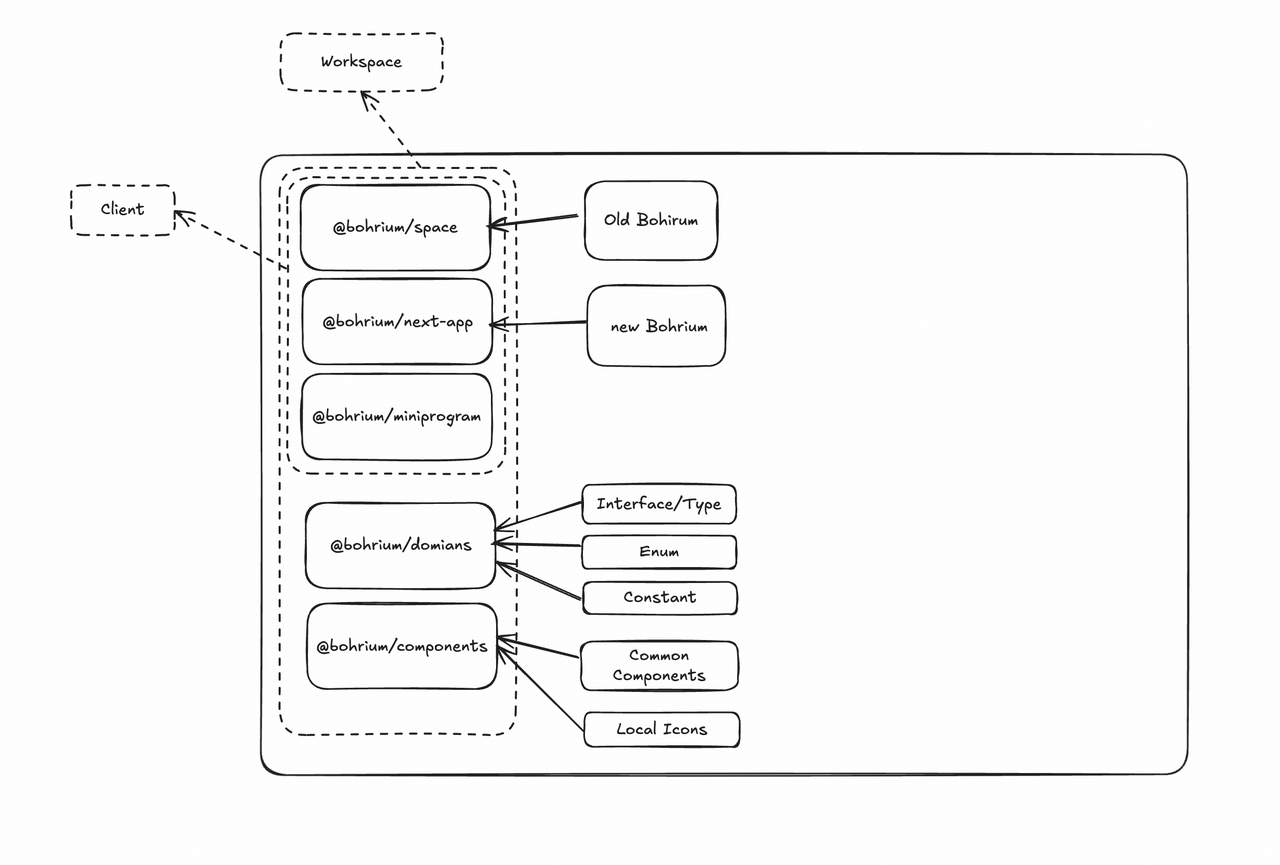
- 其中
@bohrium/space是 CSR 项目,99% 的页面和代码都在这里 @bohrium/next是基于 Next.js 的 SSR 项目,有两个页面:- 专利详情页:是一个新的业务,直接就写成了 SSR
- 文献详情页:对之前 CSR 项目的复制,只做了很基础的迁移,按钮和交互等都是无法使用的,仅供爬虫和 SEO 访问,正常用户还是访问的 CSR 版本
@bohrium/domains和@bohrium/components包是一些抽离的公共模块
目标
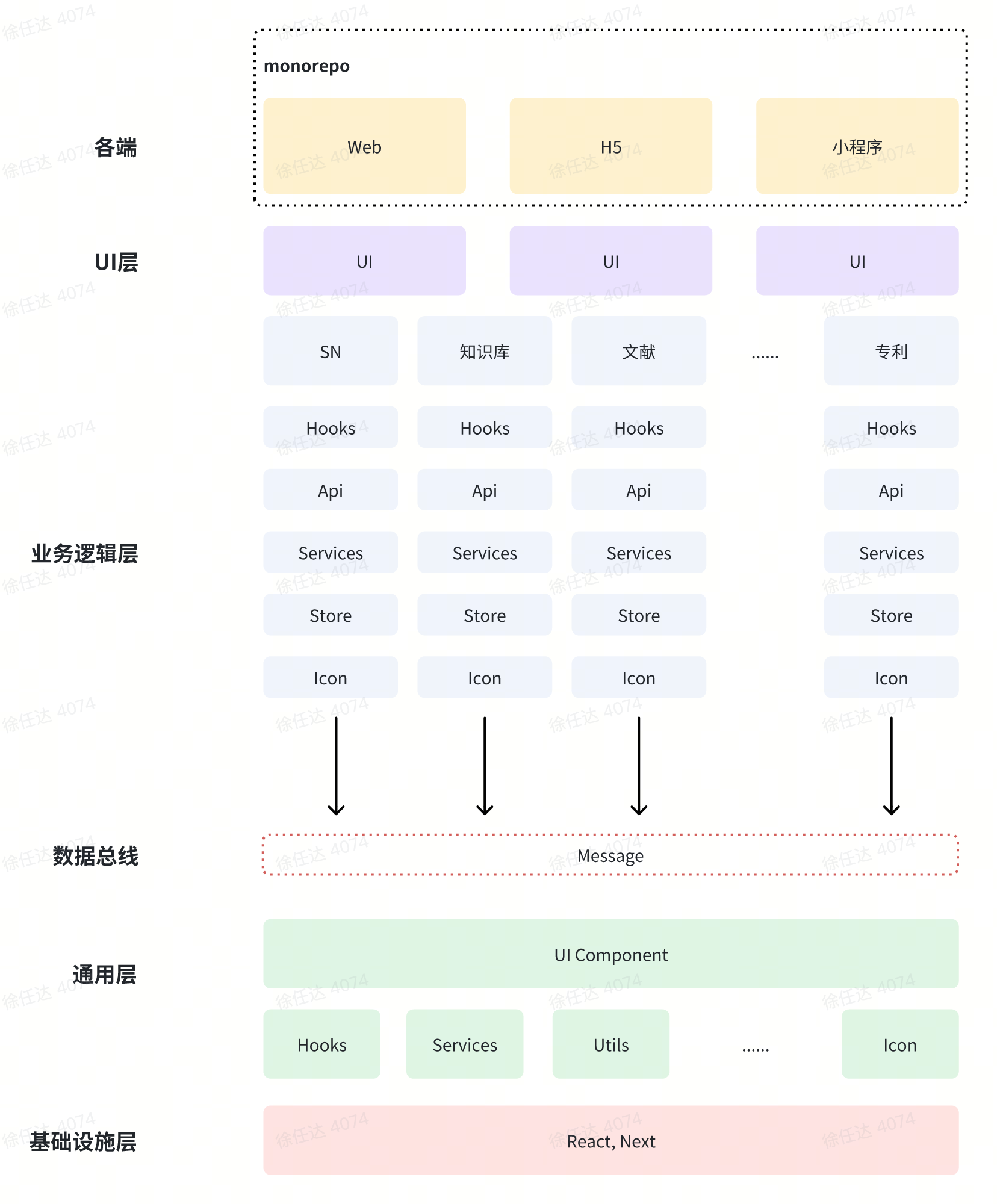
- UI 层不处理任何业务逻辑,只做展示,需要具备 stateless 能力
- 业务逻辑层包括各种业务处理,数据处理,状态维护等
- 数据总线,各子模块之间的事件传递通过数据总线通信,下层不允许直接调用上层(通用层不可以调业务逻辑层),需要通过数据总线通信
- 除平台层,其他层禁止直接使用平台相关 API,如
window.xxx,wechat.xxx等。可以预留接口,由平台层注入平台相关 API
想法
workspce 结构
├── bohrium-shared      # 通用层
├── bohrium-domains     # 业务层:上图中的业务逻辑层+业务UI层
├── bohrium-space       # 平台层:Web/H5 CSR
├── bohrium-next-app    # 平台层:Web/H5 SSR

# 之后可能会加
├── bohrium-wx-applet   # 平台层:微信小程序
├── bohrium-electron    # 平台层:桌面应用
├── bohrium-mobile      # 平台层:移动端

# 现在 Web/H5 都混在一个包中了,可以考虑单分一个 H5 包
├── bohrium-h5          # 平台层:H5
......
@bohrium/shared
通用层:业务无关、平台无关、无状态和副作用(hooks)
├── bohrium-shared
│   ├── ui/           # UI Widgets
│   │  ├── Button/
│   │  └── Modal/
│   ├── utils/        # 工具函数
│   │  └── EventBus/ # 事件总线
│   ├── constants/    # 常量
│   ├── types/        # TS 类型定义
│   ├── icons/        # icons
ui
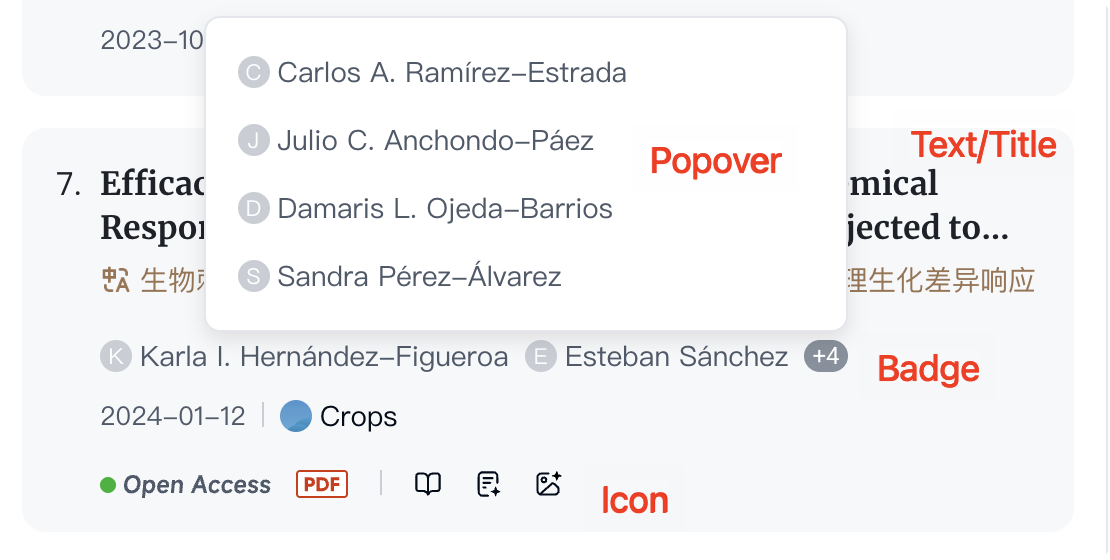
- 只负责 UI 展示,无任何逻辑、状态和副作用
- 只是最基础的通用小组件,而不是业务组件
如下图中的 Text、Icon 等,而不是整个卡片
整个卡片应该放到业务层,再用这里的小组件“拼积木”
utils
事件总线:
// 发布订阅
type ObjectKey = string | number | symbol;
type AnyFunction = (...args: any[]) => any;

class EventBus {
    // Map<eventName, Map<originalCallback, callback>>
    // originalCallback 用于取消 once 注册的回调
    private events: Map<ObjectKey, Map<AnyFunction, AnyFunction>>;

    constructor() {
        this.events = new Map();
    }

    // 使用泛型的原因:...args 有类型,方便代码提示和类型检查
    emit<T extends AnyFunction>(eventName: ObjectKey, ...args: Parameters<T>) {
        const events = this.events.get(eventName);
        if (!events) {
            return;
        }
        events.forEach(callback => {
            callback(...args);
        });
    }

    on<T extends AnyFunction>(eventName: ObjectKey, callback: T) {
        this._on(eventName, callback, callback);
    }

    once<T extends AnyFunction>(eventName: ObjectKey, callback: T) {
        // 包装方法:执行一次后取消订阅
        const wrapper = (...args: Parameters<T>) => {
            callback(...args);
            this.off(eventName, callback);
        };
        this._on(eventName, wrapper, callback);
    }

    off<T extends AnyFunction>(eventName: ObjectKey, callback: T): boolean {
        const events = this.events.get(eventName);
        if (!events) {
            return false;
        }
        return events.delete(callback);
    }

    offAll(eventName: ObjectKey): boolean {
        return this.events.delete(eventName);
    }

    private _on(eventName: ObjectKey, callback: AnyFunction, originalCallback: AnyFunction) {
        let events = this.events.get(eventName);
        if (!events) {
            events = new Map();
            this.events.set(eventName, events);
        }
        events.set(originalCallback, callback);
    }
}

export const eventBus = new EventBus();
平台接口:
// 平台相关的 PAI 接口定义,代码中调用这个接口中的方法
export const platform = {
    // 打开新页面
    openNewPage(url: string | URL, opts: any) {},
    // 从本地存储取值
    getItemFromStorage<T>(key: string, opts: any): Promise<T> {},
    // ...
}
// 平台层注入具体实现
// web
function init() {
platform.openNewPage = window.open
platform.getItemFromStorage(key: string, opts: any) {
const { target = 'local' } = opts || {}
switch (target) {
case 'local':
return Promise.resolve(window.localStorage.getItem(key))
// ...
}
}
}
// electron
function init() {
platform.openNewPage = require('electron').shell.openExternal
platform.getItemFromStorage(key: string, opts: any) {
const { target = 'local' } = opts || {}
switch (target) {
case 'local':
return require('fs').promises.readFile('/config.db')
// ...
}
}
}Hooks
事件总线:
export function useEventSubscribe(eventName: ObjectKey, callback: AnyFunction, once: boolean = false) {
    useEffect(() => {
        if (once) {
            eventBus.once(eventName, callback);
        } else {
            eventBus.on(eventName, callback);
        }
        return () => {
            eventBus.off(eventName, callback);
        };
    }, [eventName, callback, once]);
}


// 升级版
### ✅ 方案:多表 + 泛型表参数

#### 1️⃣ 按业务拆分事件定义


// events/auth.events.ts
export interface AuthEvents {
  login: { userId: number; userName: string };
  logout: undefined;
}

// events/theme.events.ts
export interface ThemeEvents {
  themeChanged: { mode: 'light' | 'dark' };
}

// events/order.events.ts
export interface OrderEvents {
  orderCreated: { orderId: string; amount: number };
  orderPaid: { orderId: string };
}


#### 2️⃣ 改造 Hook:把“表”变成泛型参数


// eventBus/useEventChannel.ts
import { useEventStore } from './eventStore';

export function useEventChannel<
  EMap extends Record<string, unknown>
>() {
  const setEvent = useEventStore((s) => s.setEvent);

  function trigger<K extends keyof EMap>(
    type: K,
    payload: EMap[K]
  ) {
    setEvent({ type: type as string, payload });
  }

  function subscribe<K extends keyof EMap>(
    type: K,
    handler: (payload: EMap[K]) => void
  ) {
    return useEventStore.subscribe(
      (state) => state.lastEvent,
      (latest) => {
        if (latest?.type === type) {
          handler(latest.payload as EMap[K]);
        }
      }
    );
  }

  return { trigger, subscribe };
}
懒加载组件
import { useEffect, useState } from "react"

export function useLazyComponent<T>(loader: () => Promise<{ default: T }>) {
  const [Component, setComponent] = useState<T | null>(null)

  useEffect(() => {
    let mounted = true
    loader().then(mod => {
      if (mounted) setComponent(mod.default)
    })
    return () => {
      mounted = false
    }
  }, [])

  return Component
}


// 示例
const UserForm = useLazyComponent(() => import("./UserFormView"))
return showForm && UserForm ? <UserForm ... /> : null
@bohrium/domains
业务层:上图中的业务逻辑层+业务UI层。平台无关
domains 翻译为 “领域”
当前用作 Interface、type、enum、constant 可能不太符合
业务包更符合语义
├── bohrium-domains
│   ├── biz/                 # 各个业务自己的逻辑
│   │  ├── knowledge-base/
│   │  │   ├── home-page/   # 模块 1(以页面/功能划分)
│   │  │   │   ├── ui/
│   │  │   │   ├── components/
│   │  │   │   ├── stores/
│   │  │   │   ├── hooks/
│   │  │   │   ├── utils/
│   │  │   │   ├── types/
│   │  │   │   └── constants/
│   │  │   ├── share-page/  # 模块 2(以页面/功能划分)
│   │  │   ├── ui/          # 当前业务通用的无状态、无副作用 UI
│   │  │   ├── components/  # 当前业务通用的有状态和副作用组件
│   │  │   ├── stores/      # 业务通用 zustand
│   │  │   ├── hooks/       # 业务通用
│   │  │   ├── utils/       # 业务通用
│   │  │   ├── types/       # 业务通用
│   │  │   ├── constants/   # 业务通用
│   │  │   ├── apis/        # 当前业务的所有的 api 都放这里,不分散到子模块
│   │  │   └── events/      # 事件总线的监听和触发统一到这里,不要散布到各处
│   │  ├── ai-search/
│   │  └── global-sidebar/
│   ├── shared/              # 多个业务共享
│   │  ├── paper-card/      # 共享模块 1
│   │  ├── └── ui、stores、hooks ……
│   │  ├── constants/       # 如:后端返回的 code 码
│   │  └── ui、stores、hooks ……
│   ├── locales/             # i18n
状态管理使用 zustand,去除所有 Context、Redux
biz
各个业务有自己的 UI、stores、hooks、utils、apis、types、constants
不同业务之间不要强耦合,尽量不直接 import 其他业务的代码,可以:
- 多个业务都用到的组件、方法等,提取到 shared 文件夹下
- 多个业务通信使用事件总线
shared
多个业务都用到的组件、方法等
如:文献卡片、收藏弹窗
@bohrium/space
平台层
├── bohrium-space
│   ├── router/
│   ├── pages/
│   ├── config/
│   ├── App.tsx
│   ├── white-screen-check.ts
│   ├── bootstrap.ts
│   ├── index.less
平台层如何复用业务层?
多个平台自由引用组合业务层代码,如:web/h5可以使用业务层UI/component;mobile可能没有DOM,无法使用UI/component,但可以使用 utils、icon……
UI VS. component
- UI:无状态、无副作用 UI,纯函数:(props) → JSX
- 无状态、无副作用不是指不能使用 hooks,如 useMemo、useCallBack 还是可以使用的
- 状态包括 useState、store 中的 State
- components:有自己状态和副作用的组件
UI
纯函数:(props) → JSX:输入的 props 相同,输出的 JSX 永远相同
输入只靠 props,内部没有自己的 State,也不产生任何副作用
props 分为:输入、输出事件(onClick)
- 常见的状态:useState、store、context、EventBus
- 常见的副作用:useEffect、读写 URL 参数、读写 Storage
components
可以有自己状态,可以产生副作用
- UI 内部可以使用其他 UI “搭积木”
- components 可以使用其他 UI 和 components “搭积木”
示例
一眼区分
UI 和 components 放到不同的文件夹下
Import 的代码要想知道是 UI/components 需要看引入路径,还是比较麻烦的
建议所有UI都以 UI 结尾,components 无需特殊标识,这样就可以一眼区分了
如:
-
import { UserListViewUI } from “./UserListView” → ui
-
import { UserListPage } from ”@/components/UserListPage” → components
-
→ components → ui
// ui: 无状态、无副作用
import { UserListViewUI } from "./UserListView"
import { UserFormViewUI } from "./UserFormView"

type Props = {
  users: { id: string; name: string; email: string }[]
  showForm: boolean
  onAddClick: () => void
  onCancel: () => void
  onSubmit: (form: { name: string; email: string }) => void
}

export function UserListContainerUI({
  users,
  showForm,
  onAddClick,
  onCancel,
  onSubmit
}: Props) {
  return (
    <div>
      <UserListViewUI users={users} onAddClick={onAddClick} />
      {showForm && <UserFormViewUI onSubmit={onSubmit} onCancel={onCancel} />}
    </div>
  )
}
// component
import { useUserListPage } from "@/hooks/useUserListPage"
import { UserListContainerUI } from "../ui/UserListContainerUI"
export function UserListPage() {
// state
const { state, actions } = useUserListPage()
// 副作用
useEffect(() => {
window.title = 'User List'
}, [])
return (
<UserListContainerUI
users={state.users}
showForm={state.showForm}
onAddClick={actions.openForm}
onCancel={actions.closeForm}
onSubmit={actions.addUser}
/>
)
}事件总线
// 定义各个业务暴露的事件总线 key

const AI_SEARCH_KEY = 'ai-search'
const AI_SEARCH_EVENT = {
    // 做搜索
    doSearch(value: string): boolean {},
}
export const AI_SEARCH_EVENTS = Object.keys(AI_SEARCH_EVENT).reduce((prev, curr) => {
    prev[curr] = `${AI_SEARCH_KEY}:${curr}`
}, {})
// {
//     'doSearch': 'ai-search:doSearch'
// }

const KNOWLEDGE_BASE_KEY = 'knowledge-base'
const KNOWLEDGE_BASE_EVENT = {
    // 打开 Zotero 导入框
    openZoteroImportModal(open: boolean): void {},
}
export const KNOWLEDGE_BASE_EVENTS = Object.keys(AI_SEARCH_EVENT).reduce((prev, curr) => {
    prev[curr] = `${KNOWLEDGE_BASE_KEY}:${curr}`
}, {})
// 每个业务在 /events/listen.ts 监听暴露的方法
eventBus.on(KNOWLEDGE_BASE_EVENTS.openZoteroImportModal, (open: boolean) => {
store.setZoteroImportModalOpen(open)
})// 每个业务在 /events/call.ts 文件夹列举会调用其他业务的条目
// 而不是把通过事件总线触发其他业务的逻辑分布到代码各处
// 这样看这一个文件就能知道当前业务耦合了哪些业务
export function openZoteroImportModal(open: boolean) {
eventBus.emit(KNOWLEDGE_BASE_EVENTS.openZoteroImportModal, open)
}
// 业务其他地方调用这个方法问题:CSR和SSR是两个项目,上面实现的EventBus是基于内存的,两个项目不共享
解决:web 平台考虑改成基于 https://developer.mozilla.org/zh-CN/docs/Web/API/BroadcastChannel
缓存:
https://github.com/vercel/next.js/tree/canary/examples/cache-handler-redis
Antd in Nextjs
https://ant-design.antgroup.com/docs/react/use-with-next-cn
落地实践
注意
- 所有服务器请求接口或者其他可能失败的操作都要加catch,客户端发现没有这个数据再请求一次,否则页面直接展示服务端错误
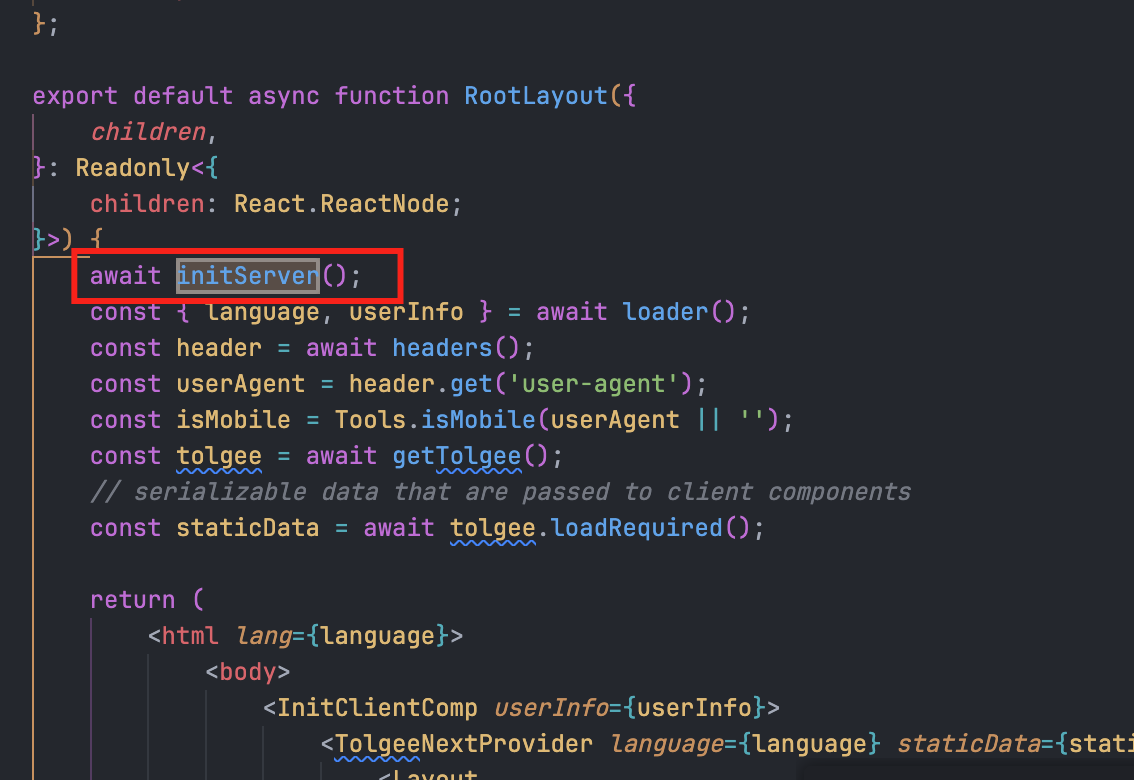
- bohrium-next-app下的xxx/page.ts中没有标记”use client”的第一行要加
await initServer() - context.current.request方法,isCata=true使用catalystPlusAxios,isAgent=true使用AgentAxios,否则使用Axios
SSR灰度策略
- 在 nacos 进行配置
- 上面的配置文件如何填写,参考:bohrium-domains/src/shared/abSSR/type.ts
路由匹配
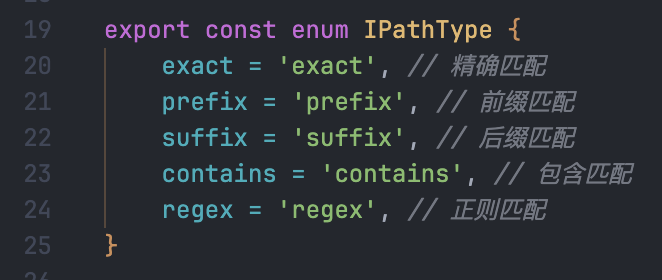
域名匹配
使用场景比如:机构和非机构走不同的规则
不传默认匹配所有域名
灰度规则
- 全走SSR
rules: ["match"]- 不走SSR
rules: ["mismatch"]- 30% 灰度
rules: [{ type: "userIdSuffix", value: [1, 2, 3] }]- 固定userId灰度
rules: [{ type: "userIdExact", value: [16782, 16783] }]- 未登录是否走灰度
rules: [{ type: "noneUserId", value: 'match' | 'mismatch' }] // 默认mismatch注意:全走 SSR 要写 rules: ["match"],而不是删掉这条规则,删掉的意思是不走SSR
dev server
要同时启动SSR和CSR项目,并监听一个端口
使用
# 项目根目录运行
pnpm install
pnpm run dev

# 浏览器访问 localhost:3002
原理
启一个Node.js服务,根据url代理两个项目的dev server并转发请求
"dev": "concurrently
        \"pnpm -r --filter=@bohrium/space run start:dev\" # CSR dev server :3000
        \"pnpm -r --filter=@bohrium/next run dev\" # SSR dev server :3001
        \"node ./deploy/dev.js" # Node.js代理服务器 :3002
        --kill-others-on-fail",
const express = require('express');
const { createProxyMiddleware } = require('http-proxy-middleware');
const app = express();
const PORT = 3002;
// 代理中间件包装器(添加调试信息)
const createDebugProxy = (target, name) => {
return createProxyMiddleware({
target,
changeOrigin: true,
ws: true,
logLevel: 'debug',
on: {
error: (err, req, res) => {
console.error(`[${name} 代理错误] ${err.message}`);
res.status(502).send(`${name} 服务不可用`);
},
proxyReq: (proxyReq, req, res) => {
console.log(`[${name}] 代理请求: ${req.method} ${req.url}`);
},
proxyRes: (proxyRes, req, res) => {
console.log(`[${name}] 收到响应: ${req.url} -> ${proxyRes.statusCode}`);
},
},
});
};
const nextProxy = createDebugProxy('http://localhost:3001', 'Next.js');
const reactProxy = createDebugProxy('http://localhost:3000', 'React');
const nextRoutePattern = /^\/(_next|__nextjs|patent-details)(\/|$)/;
// 动态路由分配
app.use((req, res, next) => {
console.log(`[入口] 请求: ${req.method} ${req.url}`);
if (nextRoutePattern.test(req.path)) {
console.log(`[路由] ${req.path} 匹配 Next.js 规则`);
nextProxy(req, res, next);
} else {
console.log(`[路由] ${req.path} 代理到 React`);
reactProxy(req, res, next);
}
});
const server = app.listen(PORT, () => {
console.log(`代理服务器运行在 http://localhost:${PORT}`);
console.log('根路径 -> React 应用');
});
server.on('upgrade', (req, socket, head) => {
console.log(`[WS] WebSocket 升级: ${req.url}`);
if (nextRoutePattern.test(req.url)) {
console.log(`[WS] 代理到 Next.js`);
nextProxy.upgrade(req, socket, head);
} else {
console.log(`[WS] 代理到 React`);
reactProxy.upgrade(req, socket, head);
}
});
// 捕获未处理异常
process.on('uncaughtException', err => {
console.error('未捕获异常:', err);
});常见功能
类型定义(可能不是最新,最新见bohrium-shared/src/context.ts):
export type GlobalContextType = {
    request: <T extends { code: number; data: unknown } = { code: number; data: unknown }>(
        method: 'POST' | 'GET' | 'PUT' | 'DELETE' | 'PATCH',
        url: string,
        options?: {
            headers?: Record<string, string>;
            params?: any;
            paramsSerializer?: ParamsSerializerOptions | CustomParamsSerializer;
            body?: RequestInit['body'] | Record<string, any>;
            signal?: AbortSignal;
            timeout?: number;
            withCredentials?: boolean;
            baseUrl?: string;
            isCata?: boolean;
            skipAuthentication?: boolean;
            toastFail?: boolean,
            refreshAfterLogin?: boolean,
        }
    ) => Promise<T>;
    useRouter: () => {
        pathname: string;
        searchParams: Record<string, string>;
        replace: (url: string | 'not-found') => void;
        push: (url: string | 'not-found') => void;
        back: () => void;
        forward: () => void;
        reload: () => void;
        canBack: () => boolean;
    };
    isMobile: () => boolean;
    getUserInfo: () => IUserInfo | null;
    getToken: () => string | null;
    getEnv: () => Env | null;
    syncStorage: (type?: 'local') => {
        setItem: (key: string, value: string) => void;
        getItem: (key: string) => string | null;
        removeItem: (key: string) => void;
    };
};
使用:
import { getContext } from '@bohrium/shared/index';
import useIsChinese from '@bohrium/shared/hooks/useIsChinese';
import useLang from '@bohrium/shared/hooks/useLang';
import useLocale from '@bohrium/shared/hooks/useLocale';

const context = getContext();

export default function JournalListPage(props: JournalListPageProps) {
    // 是否中文
    const isChinese = useIsChinese();

    // export enum LANGUAGE {
    //   CHINESE = 'zh-cn',
    //   ENGLISH = 'en-us',
    // }
    const lang = useLang();

    // export enum LOCALE {
    //   ZH = 'zh',
    //   EN = 'en'o
    // }
    const locale = useLocale();

    // 路由相关,hook:不可放入循环和条件语句
    const router = context.current.useRouter();
    const isMobile = context.current.useMobile();

    // userInfo,未登录为null
    const userInfo = context.current.getUserInfo();

    return <div>123</div>;
}
导入其他包
比如在demains包中:
export const a = '11'想要在next-app包中导入:
- 配置next-app包的tsconfig.json:
{
  "$schema": "https://json.schemastore.org/tsconfig",
  "compilerOptions": {
    "baseUrl": ".",
    "paths": {
        "@/*": ["./src/*"],
        "@bohrium/shared/*": ["../bohrium-shared/src/*"],
        "@bohrium/domains/*": ["../bohrium-domains/src/*"],
    },
    // 其他配置
  },
  // 其他配置
}- 导入
import { a } from '@bohrium/domains/biz/journal-library';

console.log('~~~~~!a', a);
i18n
注意事项:
- 写next的页面需要添加动态加载命名空间的逻辑
- 在 useEffect、useCallback、useMemo 使用到 t(‘xx’) 的地方要把 t 写入依赖数组中
- tolgee key禁止使用中文,en文案value禁止使用中文
- tolgee命名空间规划合理,宁可在多个命名空间冗余,也不要跨命名空间使用
i18n 文件统一放在 bohrium-domains/src/locales 文件夹下,通过 Tolgee 管理
// 在bohrium-domains目录下

// 拉取
tolgee pull
// 同步
tolgee sync
客户端组件使用:
"use client"

import { useTranslate } from '@tolgee/react';

export default function JournalCardUI(props: JournalCardUIProps) {
    const { t } = useTranslate('journal');

    return (
        <div>
            {t('test')}
        </div>
    );
}
服务端组件使用:
// @bohrium/next 包传给 @bohrium/domain 包

// next包下代码
import { getLocale, getTranslate } from '@/locales/tolgee/server';

export default async function Page() {
    const t = await getTranslate('journal');
    return <JournalCardUI t={t} />
}


// domain包下代码
export default function JournalCardUI(props: JournalCardUIProps) {
    const { t } = props;

    return (
        <div>
            {t('test')}
        </div>
    );
}
请求接口
import { request } from '@bohrium/domains/shared/utils/request';

export const subscribeLibraryJournal = (publicationId: number) => {
    return request('POST', '/catalystPlus/subscribe/auth/journal', { body: { publicationId } });
};

export const unsubscribeLibraryJournal = (publicationId: number) => {
    return request('POST', '/catalystPlus/subscribe/auth/journal/cancel', { body: { publicationId } });
};
客户端组件使用:
import { useMutation, useQuery } from 'react-query';

export default function JournalSubscribeBtn({
    item,
    refresh,
    subscribeBtnProps = { type: 'text' },
    isRound = true,
    customStyles = {},
    subscribeText,
}: JournalSubscribeBtnProps) {
    const { mutateAsync } = useMutation({
        mutationFn: (params: { publicationId: number; isSubscribe: boolean }) => {
            const { isSubscribe, publicationId } = params;
            return isSubscribe ? subscribeLibraryJournal(publicationId) : unsubscribeLibraryJournal(publicationId);
        },
    });
}
服务端组件使用:
// @bohrium/next 包传给 @bohrium/domain 包

// next包下代码
import { subscribeLibraryJournal } from '@bohrium/domain/biz/journal-library/apis/subscribe.ts';

export default async function Page() {
    const data = await subscribeLibraryJournal(1);
    return <JournalCardUI data={data} />
}


// domain包下代码
export default function JournalCardUI(props: JournalCardUIProps) {
    const { data } = props;

    return (
        <div>
            {data}
        </div>
    );
}
Icon
将svg文件放入bohrium-shared/src/icons/svg目录下,进入bohrium-shared目录运行pnpm run generate-icons,会在bohrium-shared/src/icons/svg-components目录生成对应组件,使用该组件
详见:bohrium-shared/README.md
import { OutlinedBellCheckIcon, OutlinedBellPlusIcon } from '@bohrium/shared/icons';

<OutlinedBellCheckIcon className={isRound ? 'text-color-success' : ''} />
查看已有Icon:
pnpm -r --filter=@bohrium/shared run storybook使用环境变量
配置:
/**
 * @type {import('next').NextConfig}
 */
const nextConfig = {
    env: {
        PUBLIC_URL: 'https://cdn1.deepmd.net/bohrium/web',
        CDN_URL: 'https://cdn1.deepmd.net',
    },
    // 其他配置
};
module.exports = nextConfig;
使用:
export const getJournalDefaultCover = (journalName: string) => {
    const defaultCovers = [
        `${process.env.CDN_URL}/static/img/6f049096journal_1.png`,
        `${process.env.CDN_URL}/static/img/779ecc90journal_2.png`,
        `${process.env.CDN_URL}/static/img/9f326df1journal_3.png`,
        `${process.env.CDN_URL}/static/img/57c0c767journal_4.png`,
        `${process.env.CDN_URL}/static/img/d8a802f9journal_5.png`,
    ];
    return defaultCovers[journalName?.slice(-1)?.charCodeAt(0) % 5];
};